Introduction:
In this Blog we will see how to filter Email To/Cc/Bcc Fields in CRM/Model Driven Apps
Implementation Steps:
Consider if I have an Email Table with To/CC/Bcc Fields, but To Fields contains lots of Entities in it, But we need to Restrict to Some of the Entities alone
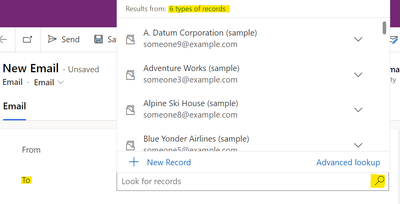
Here is the List of Entities with TO Fields,

Let's See how we can filter this Fields..
Steps to Follow :
1. Navigate to https://make.powerapps.com
2. Click Solutions --> Create a New Solution or open an Existing Solution
3. Click Add --> Select New Web Resource
4. Write Below Code and Save it..
function SetDefaultView(executionContext) {
var formContext = executionContext.getFormContext();
var customerControl = formContext.getControl("to");
if (customerControl.getEntityTypes().length > 1) {
customerControl.setEntityTypes(['account','contact']);
}
}
the Above code mentioned that we are taking the Control ("TO") and filtering the ENTITYTYPES only to ACCOUNT AND CONTACT Table.
5. Once Done , Call this Event in OnLoad of the Form once the Page Loaded you will see only 2 Entity Types with Account and Contact

That's it 
Using JavaScript we can Filter the TO/CC/BCC fields in Email table


No comments:
Post a Comment